Whether you are trying to grow your career, your credentials, or your business, a pesticide applicator license may be in your future! This blog is intended to help pesticide applicators in Orange County, Florida navigate pesticide licenses and how to sign up for an exam.
Which pesticide applicator license do you need?
There are a lot of pesticide applicator licenses in Florida. The one you need is determined by the site where you apply pesticides. Click the link and download the PDF for ease of viewing.
https://edis.ifas.ufl.edu/publication/PI292
This hefty document contains a 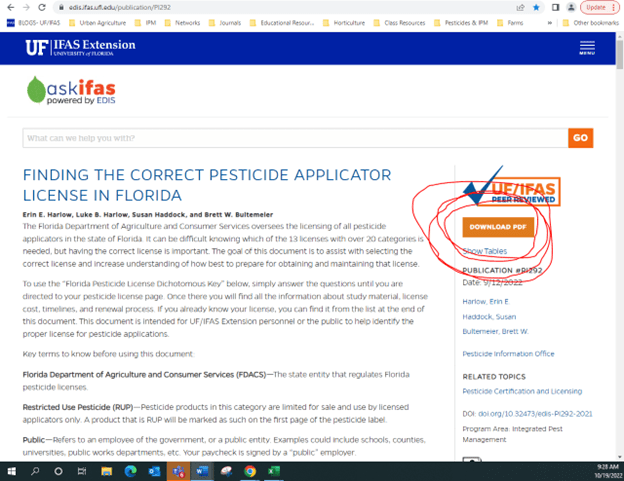 lot of important information to help you prepare for your exam and to maintain your license once you obtain it. Different licenses have different requirements. Check the prerequisites, exam fees, which exams you will need to pass with which % score. Some of you will need to pass two different exams, maybe more. Order the study materials and STUDY!
http://ifasbooks.ifas.ufl.edu/c-114-pesticide-exam-study-materials.aspx
Apply for and schedule your exams:
Complete Steps 1 and 2 (and all the mini steps in between) on this website: https://pesticideexam.ifas.ufl.edu/
If you have not already done so, you will need to create an account with the new system: https://aeslicensing.fdacs.gov/
Note that any old 482 vouchers that were paid for, received, and unused before 4/1/2025 need to be reassigned. Please email FDACS to obtain your new voucher number: AEScares@fdacs.gov
Testing Options
Remote Exams Already available and scheduled directly through Everblue. See computer technical specifications below.
- Cost: $32
- ️ Flexible testing from any location.
In-Person Exams Available at Everblue test centers across Florida.
- Cost: $59
- View Testing Locations here: <https://www.google.com/maps/d/u/3/edit?mid=15L1-gcd3Kar_VMDfqMHuP28FbRSjeWs&usp=sharing>
There will be occasional testing days with waived fees. For questions or assistance, please contact AESCares@fdacs.gov.
Troubleshooting Voucher Numbers and Exam Scheduling:
- Everblue contact 1-888-502-8151
- FDACS contact AESCares@fdacs.gov
Remote Online Exam Technical Specifications & Requirements
- You must use a regular computer (Windows 7+ / MacOS 10.11+ computer or laptop). Chromebooks and mobile device are not supported (e.g., iPhone, iPad, Android device, etc)..
- Be sure your computer operating system (OS) software is up to date and that you have shut down/restarted your computer prior to taking your exam. We recommend not opening any other programs on your computer other than your exam.
- You must use the current version of Google Chrome or Microsoft Edge as your web browser.
- You must install the free extension Proctorio. The steps to do this will be available before your exam. Please review the Proctorio Minimum System Requirements
- You will need to have Internet Speed Upload: 1 Mbps and Download: 2 Mbps. VPN, Tethering, Cellular and Hotspots are not supported.
- You will need at least 2 GB free RAM on your computer.
- You need a working webcam and microphone and these devices must NOT be shut off or blocked in anyway during your exam session. Failure to maintain a working webcam and mic or blocking such devices will terminate your exam session and /or disqualify you from the exam. Once the exam begins, your face and eyes must remain facing towards the webcam for the duration of your exam session—please note that your webcam view is shown in the exam Quiz Tools. If you cannot see yourself entire face in the Quiz Tools webcam image, then the exam Proctor cannot see you either—leading to disqualification.
- Have a government issued photo ID card available. Your photo ID will be required to be clearly visible on the webcam prior to taking the exam.
- A room scan will be required. Be prepared to turn the webcam 360o to allow for a full view of the room. Proctorio may ask more than once if the program hears noises – the application is trying to ensure there is no one else in the room.
- You must be alone during your exam attempt.
- The use of outside resources is strictly prohibited (e.g., mobile device, books, calculators, notes).
Here is a detailed blog about Testing from Home, and What You Need To Know! https://blogs.ifas.ufl.edu/pesticideinformation/2022/09/15/testing-from-home-what-you-need-to-know/
 0
0